Before you start, please read this short note about a Windows message you might see.
Windows Defender SmartScreen Notice
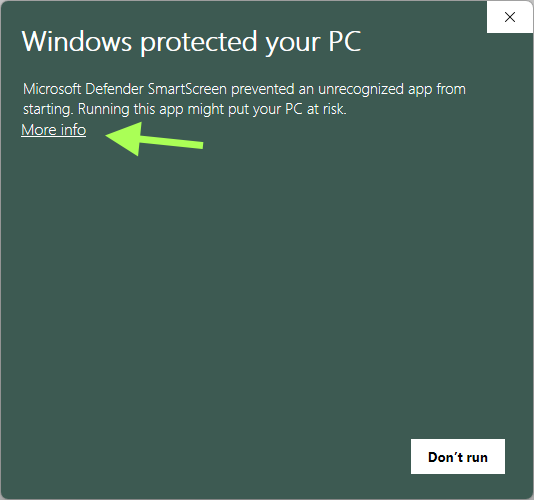
If you see a message like this when starting the installer:
“Windows protected your PC”
Microsoft Defender SmartScreen prevented an unrecognized app from starting.
don’t worry — the file is safe and digitally signed.
Why this message appears
We recently updated our code-signing certificate to a new one issued toCheckPCB GmbH (Cologne, Germany).
Windows Defender SmartScreen uses a reputation system based on download history. When a certificate is new, it has not yet built reputation — so Windows shows this warning even for trusted software.
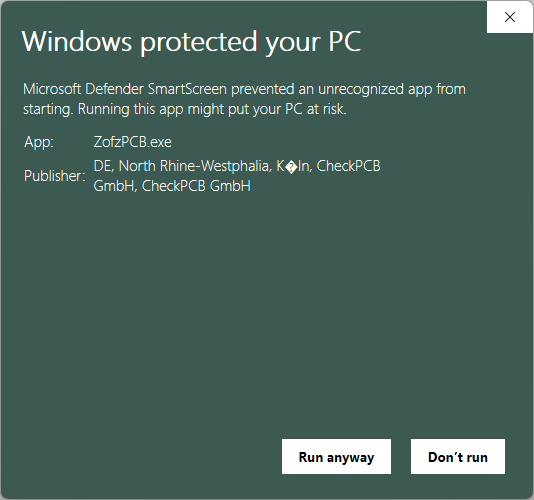
How to continue safely- On the warning dialog, click “More info.”
- Confirm that the publisher is CheckPCB GmbH.
- Click “Run anyway.”
ZofzPCB will then install and run normally.
How to verify the file manually (optional)
If you’d like to double-check the file:- Right-click the downloaded installer → Properties → Digital Signatures
- Select the signature by CheckPCB GmbH
- Click Details and make sure that
- The signature is valid
- The certificate is issued to CheckPCB GmbH, Cologne, Germany
- The signature is timestamped
Important Notes
- This warning does not indicate malware or any risk — it only appears because the certificate is new and still building reputation.
- The message will disappear automatically once more users have downloaded and run the signed installer.
- All official downloads are always digitally signed by CheckPCB GmbH and distributed exclusively through www.zofzpcb.com.
Thank you for your trust
We take software security and transparency seriously.
Your download helps establish trust for our new certificate — and ensures that future installations will be even smoother.
Version Notes, please go to forum (Released Versions).