Free 3D IPC-2581 viewer
Open IPC-2581 files in 3D, for free. One XML file, and ZofzPCB shows your complete board as it comes back from assembly: all layers, drills, nets and components in place. On Windows, without uploading your design anywhere.
Includes the STEP Export plugin free for 30 days. Free version forever after. No credit card required.
Listed by the IPC-2581 Consortium as a free IPC-2581 viewer.
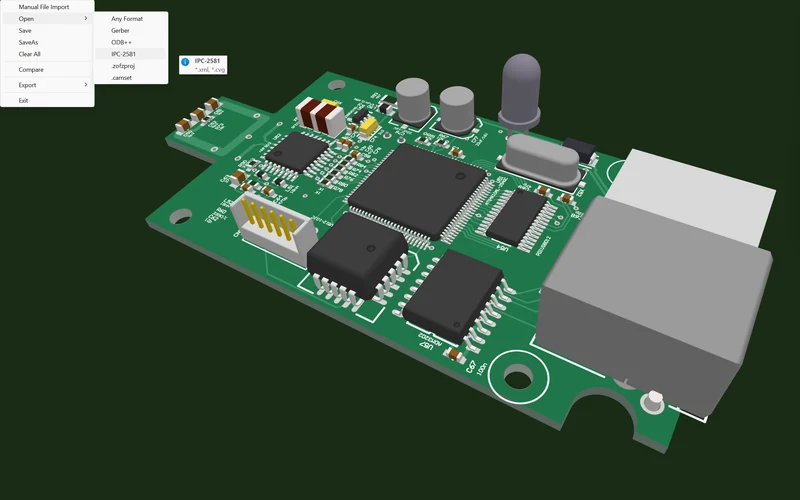 Open > IPC-2581 (.xml, .cvg) over an assembled PCB in 3D" style="display:block;width:100%;height:100%;object-fit:contain" data-i18n-attr="alt:hero.alt">
Why IPC-2581 is ideal for 3D validation
IPC-2581 is an open, vendor-neutral standard: one single XML file instead of a folder of separate Gerber, drill and netlist files. It contains everything a Gerber file set does (images of all layers, drills, netlist, BOM and stackup), strictly structured. So ZofzPCB usually needs nothing else to understand your board and its components. Thanks to the included geometry data and netlist (the equivalent of IPC-356), ZofzPCB creates the component models right from the start. That's why our Quick-start Guide recommends IPC-2581 as the most complete format.
Open IPC-2581 in three steps
- 01
Download ZofzPCB
and get your free license key by email.
- 02
Go to File → Open → IPC-2581
and choose your IPC-2581 XML file. No autoloader or file sorting needed.
- 03
Your board appears in 3D
with components. Rotate it, cut it open, measure it.
What you can do with your IPC-2581 file
See inside the board: cross-sections at any angle, peel and expand layers.
Find anything: highlight any net, component or pin across all layers.
Measure precisely: Distances and clearances between pads, tracks, holes and edges, in X and Y on every layer. Layer thicknesses come from the stackup.
STEP Export plugin: compare two IPC-2581 revisions in 3D and export the board to mechanical CAD. Free for 30 days.
Good to know
- Supported version: ZofzPCB supports IPC-2581B.
- Stackup: most IPC-2581 files describe only the logical stackup. If the thickness information is incomplete, edit the thickness column in the stackup editor. Tip: when you enter the total board thickness in the <Profile> layer, all missing core layers are created automatically.
- Board outline: in IPC-2581 the board shape is a face, not a drawing of edges, which is much clearer than in Gerber. In rare cases, elements on drill layers are still drawings; ZofzPCB detects and converts them. If the outline edges are repeated on a drill layer, ZofzPCB removes them, so they don't cut the board shape out of the board.
- Your settings: additional settings, such as component adjustments, are saved in the .zofzproj project file. For the next board revision, apply them again.
- Consortium listing: ZofzPCB is listed among the free viewers on the IPC-2581 Consortium's website.
FAQ
Q1 Is the IPC-2581 viewer free?
Yes. Opening IPC-2581 files, the 3D view, navigation and measurement are part of the free version, with no time limit. You only need a free license key, sent by email.
Q2 Is there an online IPC-2581 viewer?
ZofzPCB is a Windows application, not an online viewer. Your IPC-2581 file contains your complete design, so ZofzPCB opens it locally instead of uploading it to someone else's server.
Q3 Which IPC-2581 version is supported?
IPC-2581B.
Q4 Do I need a separate netlist or BOM?
No. IPC-2581 already contains the netlist and component data, so ZofzPCB places your components automatically.
Q5 Should I use IPC-2581, ODB++ or Gerber?
If your EDA tool can export it, IPC-2581 is the most complete single-file option. ZofzPCB also opens ODB++ and Gerber file sets.